Config API
The Config API lets script users set up a bot from the GUI, so they don’t have to edit the script’s code. Script developers list config options in a manifest.json file in the bot’s folder. Botfather shows those options in the bot’s Config tab. The values the user enters are saved for each bot, and the script reads them using the Config API.
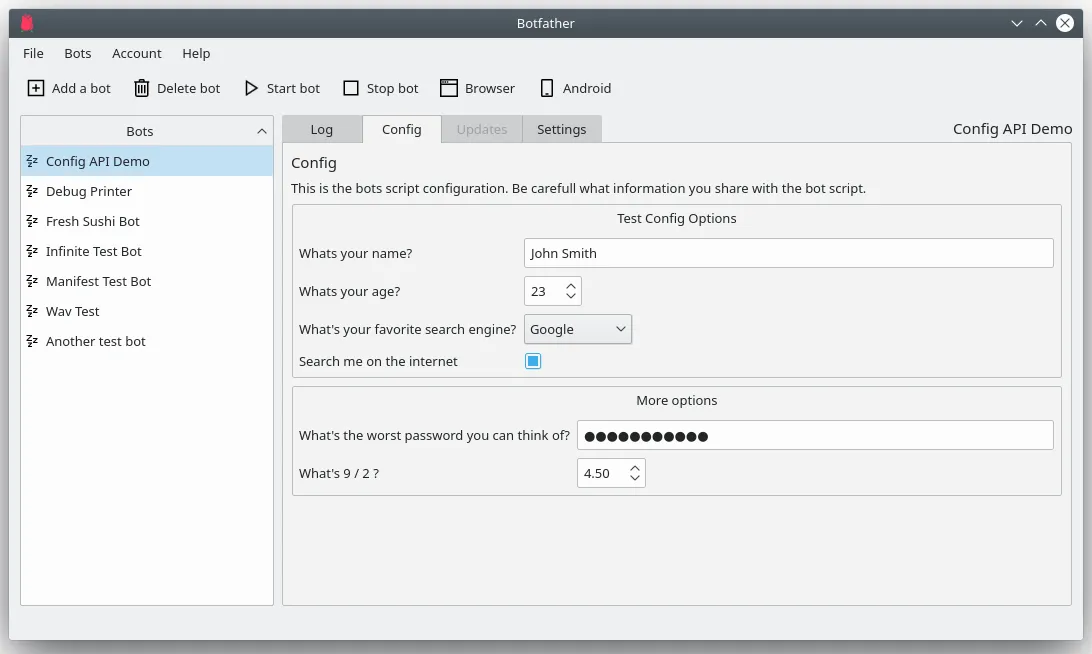
Examples
Define config options
Config options are defined in the bot’s manifest.json file. The manifest file has to be in the same folder as the bot script. Use one folder per bot, because Botfather stores the user’s config values in a .config.json file in that folder.
{
  "$schema": "https://botfather.io/schemas/manifest.schema.json",
  "manifest_version": 1,
  "script": "demo.js",
  "config": {
    "groups": [
      {
        "name": "General",
        "options": [
          {
            "id": "your_name",
            "type": "string",
            "label": "What's your name?",
            "default": "John Smith"
          },
          {
            "id": "age",
            "type": "integer",
            "label": "What's your age?",
            "default": 18,
            "min": 13,
            "max": 100
          },
          {
            "id": "look_me_up",
            "type": "boolean",
            "label": "Search me on the internet",
            "default": true
          }
        ]
      }
    ]
  }
}
Make sure your JSON is valid. If the manifest can’t be parsed, Botfather won’t show any config options for your script.
Read config values
Use the option’s id to read the value the user set.
var name = Config.getValue("your_name");
var age = Config.getValue("age");

if (Config.getValue("look_me_up")) {
  Helper.log("Looking up", name, "aged", age);
}
Provide a fallback value
Give every option a default, so it has a value as soon as the user opens the bot’s Config tab. Config.getValue returns undefined if an option doesn’t have a value yet. That’s the case when:
- the
Configtab hasn’t been shown yet, - no option has the given
id, or - the option has no
defaultand the user hasn’t changed it yet.
Provide a fallback in your script if your bot depends on the value.
var rounds = Config.getValue("rounds");
if (rounds === undefined) {
  rounds = 10;
}
The manifest file
$schema
Optional. The URL of the Botfather bot manifest JSON schema, https://botfather.io/schemas/manifest.schema.json. Specifying the schema enables modern code editors like VS Code to provide autocomplete and validation.
manifest_version
The manifest format version. Currently always 1.
script
The path of the bot’s script file, relative to the bot’s folder. If the file doesn’t exist, Botfather uses the first .js file it finds in the bot’s folder (in alphabetical order).
config
An object with a single groups array. Each group is an object with:
name(string): The title of the group’s box in theConfigtab.options(array): The config options shown in this group.
Groups only organize how options are shown. You can have as many groups as you like. The Config tab shows a scrollbar when it needs more space. Empty groups are not shown.
The Config tab is disabled unless there is at least one option with an id.
Config options
Every config option is an object with these properties:
id(string): Required. Used to read the option’s value withConfig.getValue. Options without anidare skipped.type(string): Required. Sets which input the user sees. One ofboolean,integer,number,string,passwordorchoice.label(string): Optional. The text shown next to the input.default: Optional. The value used until the user changes it. Its type should match the option’stype.
The default value is saved as soon as the bot’s Config tab is first shown. Changing the default in the manifest later won’t change values that are already saved.
boolean
Shown as a checkbox. The value is true or false.
integer
Shown as a spinbox for whole numbers. The value is a number.
min(number): Optional. The smallest value allowed.max(number): Optional. The largest value allowed.
min and max only work if both are set. Without them, the spinbox only allows values from 0 to 99.
number
Shown as a spinbox for decimal numbers. The value is a number.
min(number): Optional. The smallest value allowed.max(number): Optional. The largest value allowed.
min and max only work if both are set, and they are rounded to whole numbers. Without them, the spinbox only allows values from 0 to 99.99.
string
Shown as a text field. The value is a string. The label is also used as the field’s placeholder text. The value is saved when the user leaves the field or presses Enter.
password
Same as string, but the text is hidden while typing. The value is saved as plain text in the bot’s .config.json file, so it is not encrypted.
choice
Shown as a dropdown menu. The value is the string of the choice the user selected.
choices(object): Maps the text shown in the dropdown to the value returned byConfig.getValue. Both must be strings.
The choices are listed in alphabetical order of their text. Set default to one of the choice values. Otherwise, no choice is selected until the user picks one.
{
  "id": "search_engine_url",
  "type": "choice",
  "label": "What's your favorite search engine?",
  "default": "duckduckgo.com/",
  "choices": {
    "Google": "google.com/search",
    "DuckDuckGo": "duckduckgo.com/",
    "Bing": "bing.com/search"
  }
}
Config API methods
Config.getValue(id);
id(string): Theidof the config option, as defined in themanifest.jsonfile.
Returns the value of the config option with the given id. This is either the value the user set or the option’s default. If the option has no value yet, this method returns undefined. See Provide a fallback value.