Multiple bots and in-GUI script configuration (v5)
February 2, 2019
Run multiple bots at once and let users configure scripts from the GUI. Botfather 5.1 is about to be released, featuring a new GUI, per-bot settings, and the new Config API.
The Config API
Currently, scripts force users to install code editors to edit the script’s configuration code. Obviously, that’s confusing for some users and can result in syntax errors or wrongly typed variables. The Config API will change this.
Script developers can define config options in a manifest.json file. Those options, if defined correctly, will be rendered in the GUI. The user can then set their preferences per bot from the GUI. The config option values set by the user can then be used by the script using the new Config API.
Script developers are encouraged to add a manifest file to their bot and make GUI configuration available to their users.
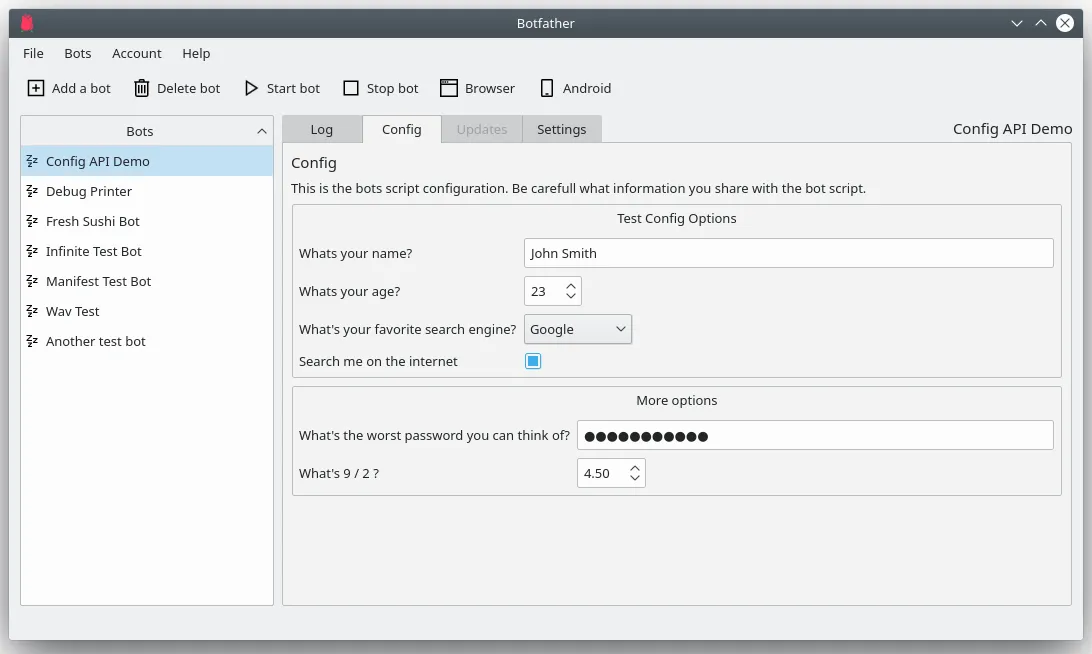
The config tab shown above is defined by the manifest.json file below. Make sure you validate your JSON markup. When there are errors, Botfather will not show any config options for your script at all.
Example manifest.json file
{
  "manifest_version": 1,
  "script": "demo.js",
  "config": {
    "groups": [
      {
        "name": "Test Config Options",
        "options": [
          {
            "id": "your_name",
            "type": "string",
            "label": "What's your name?",
            "default": "John Smith"
          },
          {
            "id": "age",
            "type": "integer",
            "label": "What's your age?",
            "min": 13,
            "max": 100
          },
          {
            "id": "search_engine_url",
            "type": "choice",
            "label": "What's your favorite search engine?",
            "default": "duckduckgo.com/",
            "choices": {
              "Google": "google.com/search",
              "DuckDuckGo": "duckduckgo.com/",
              "Bing": "bing.com/search"
            }
          },
          {
            "id": "look_me_up",
            "type": "boolean",
            "label": "Search me on the internet",
            "default": true
          }
        ]
      },
      {
        "name": "More options",
        "options": [
          {
            "id": "secret",
            "type": "password",
            "label": "What's the worst password you can think of?"
          },
          {
            "id": "math_result",
            "type": "number",
            "label": "What's 9 / 2 ?"
          }
        ]
      }
    ]
  }
}
When defining options, only id and type are required. label and default are optional. The type defines which input widget the user will see in the GUI. The id can be used to access the config values using the Config API in bot scripts.
There are currently 6 different option types to choose from:
boolean, rendered as a checkboxinteger, rendered as a simple spinboxnumber, rendered as a double spinboxstring, rendered as a line edit fieldpassword, rendered as a line edit field with password echo modechoice, rendered as a multiple-choice dropdown menu
Groups are just eye candy and allow you to organize config options. You can have as many groups as you want; the config tab will show a scrollbar when more space is needed.
The script config values can then be accessed using the Config API:
Config.getValue("your_name");
Config.getValue("age");
Config.getValue("search_engine_url");
Config.getValue("look_me_up");
Config.getValue("secret");
Config.getValue("math_result");
I’ll release a full Config API Demo script once the update has been released.
One script per folder
Make sure you no longer put multiple bot scripts in the same folder. Create a dedicated folder per bot instead. Botfather stores bot settings (.settings.ini) and the user’s script configuration (.config.ini) in the bot’s folder.
The new GUI
In a nutshell, the GUI has been rewritten to:
- allow multiple bots to be run at the same time
- allow per-bot settings such as the global stop hotkey
- allow per-bot script configuration using the new Config API
We also changed our icon theme; feel free to let us know what you think about it. You might find some old icons in the browser window; that’s because we’re about to replace it and thus no longer touch it.
Current multibot limitations
As mentioned earlier, the GUI now allows the user to start multiple bots at the same time. This is not the main feature of this update, though, and thus has some limitations:
Currently, all bots share the same browser. Thus, running more than one browser bot will cause chaos. This problem is subject to the next planned update, called the Browsanity update. It will feature a reworked Browser API that allows you to have multiple browsers at once.
The same goes for the Android API. Currently, all bots share the same Android device. But this is also subject to change with the next planned update. A new Config API option type will be released that allows users to select which Android device or emulator they want the bot to control.